Update queue reference
Update queue at /app/queue lists dependency update candidates. Select a package to open its detail page at /app/updates/$updateId.
Last verified on October 30, 2026.
Access and scope
Section titled “Access and scope”Viewers, members and administrators can read updates, copy prompts and export the queue. Members and administrators can use Accept risk and Restore in an update’s application context. These decisions require verified organization write access; viewers do not see the buttons.
The queue and copied prompts are available without a paid-plan check. Perpensa Rank refines ordering on Pro and Team. The detail page’s Ask form additionally requires explanations to be enabled and an update eligible for explanation; it is not available for every update.
The default scope is Production across All applications. Choose an application to select one of its named environments. Across applications, choose Production, Non-production, or All environments. All repositories can be narrowed to a repository used in the selected scope. Changing applications clears the selected repository and environment. A repository no longer present in the selected scope is cleared once the source list loads.
See Manage applications for source configuration.
Filters and category counts
Section titled “Filters and category counts”| Control | Behavior |
|---|---|
| Fix now | Filters to the category described as Exploited or likely, and in production. |
| Plan | Filters to Real risk, no urgent signal · schedule it. |
| Monitor | Filters to Low risk for now · we keep watching. |
| All categories | Clears the selected category. Appears when a category is selected. |
| Severity | Select All with its count, or an available severity: Critical, High, Medium, Low, or Info. A selected severity remains available even with no matches. |
| Ecosystem | Narrows results to the selected ecosystem. |
| Accepted risks | Switches from open updates to updates accepted in every context in the selected scope. A partially accepted update remains in the open list. Category selection does not restrict this view. |
| Search packages | Searches package names, scan summaries, linked CVE identifiers and finding summaries, repository names and target paths. Matching ignores case and surrounding spaces; results update after a short delay. |
Category tiles show update counts, severity summaries and a proportional distribution when open updates exist. Their counts reflect scope, repository, ecosystem and search, before category and severity filtering. The accepted-risk count also precedes severity filtering. Counts describe updates, not individual vulnerabilities.
Changing filters returns to the first page. Scope and filters are retained when opening update details and returning to the queue.
Ordering and grouping
Section titled “Ordering and grouping”Updates sort by Fix now, Plan, then Monitor, followed by descending Rank and a stable identifier tie-break. A shared update uses the most urgent category and highest rank among its relevant open contexts.
Each update appears once. Its application and environment group is chosen by highest context rank, then category urgency, application name and environment identifier. Within that group, rows are separated by repository and branch or tag. Open followed by the application name opens that application’s environment.
Other consumers appear under Shared. A group whose updates all appear elsewhere can show an all shared with note. Per-environment counts overlap when sources are shared; they do not add up to the distinct update total. Grouping can place row numbers out of sequence on screen: the numbers retain the full filtered priority order.
The queue displays 50 distinct updates per page. Previous, Next, and Page with the current and total page numbers appear when more than 50 match.
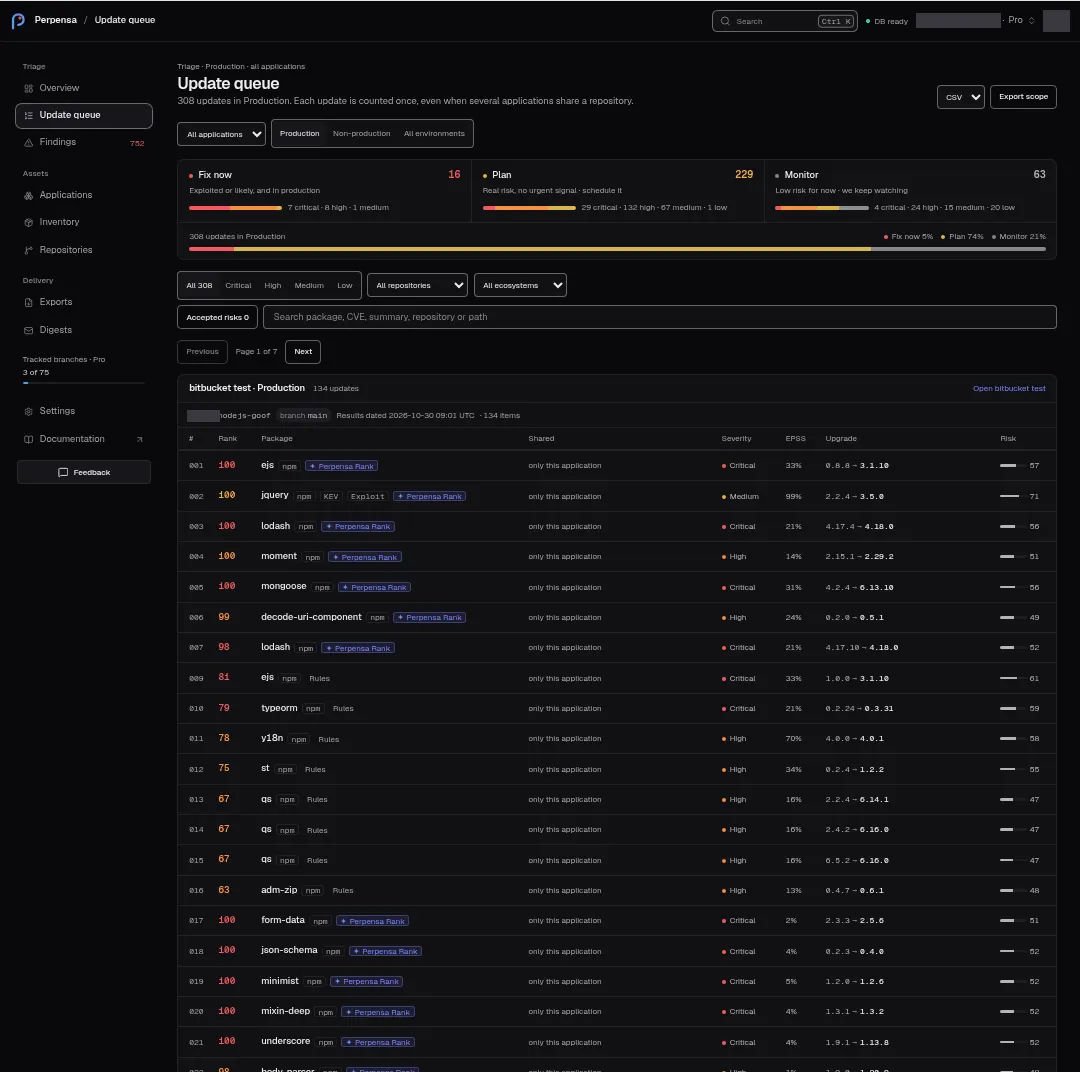
Queue columns
Section titled “Queue columns”| Column | What it shows |
|---|---|
| # | Position in the filtered priority order, retained across pages. |
| Rank | Rounded priority value. A missing value shows as zero. |
| Package | Package link and ecosystem. KEV and Exploit indicate positive evidence in linked findings. A ranking-status badge can appear beside the package. |
| Shared | Other applications or environments using the update, or only this application. Multiple manifest paths for the same source, ecosystem and package add a manifest count and the row’s path. |
| Severity | The update’s severity. |
| EPSS | Highest valid positive EPSS among linked findings, rounded to a whole percent; a positive value rounding to zero shows <1%. Missing, zero or invalid values show —, with EPSS unavailable. |
| Upgrade | Current version followed by the proposed version. For a watched public product, inspect product remediation before treating an internal package target as an actionable product upgrade. |
| Risk | Rounded technical risk score and meter; a missing score shows —. This is separate from context-dependent rank. |
Narrow layouts move sharing information beneath the package and eventually display stacked rows.
Source states
Section titled “Source states”Repository headers identify the exact branch or tag and may show these statuses:
| Status | Meaning |
|---|---|
| Results dated followed by a timestamp | Date of the completed result. |
| Grace expires followed by a timestamp | Older results remain available during failure grace. The result date can appear alongside it. |
| Refreshing | Source results are being refreshed. |
| Not scanned | The source is pending results. |
| Last attempt failed | The source’s attempt failed. |
| The tag changed commit | The tracked tag needs review. |
| Orphaned · historical results | Retained results belong to an orphaned source. |
| No current results | The source has no supported current result; this label is suppressed when its update rows are listed. |
Queue source timestamps use UTC to the minute. Source warnings can remain visible without update rows in the unfiltered first page. Use the application link to inspect or repair the source.
Export scope and bulk actions
Section titled “Export scope and bulk actions”Choose CSV in Export format, then Export scope. The download uses the selected application, environment and repository scope. It does not send the text, category, severity, ecosystem or accepted-risk filters to the export request, and it is not limited to the displayed page.
Export is disabled while loading, while an export is pending, or when the page has a load error. The endpoint permits 20 export requests per organization per minute. Failures show the returned error or Export failed. See Export results.
The queue has no row selection or bulk accept, restore, or apply-update control. Exporting changes no dependency or risk decision.
Update details
Section titled “Update details”The header shows the package, category, ecosystem, repository, branch or tag, severity and available first-seen date. Breaking marks a breaking package update. A retained suppressed update can show Suppressed.
Update queue returns to the retained queue view. K and J, also labeled Previous update and Next update, move within the filtered cohort. For open updates, navigation stays in the current category; in accepted risks, it spans the accepted list. It can move beyond the current queue page. Buttons are disabled at the ends. Unmodified J/K shortcuts work outside text-entry controls.
| Panel | Fields and actions |
|---|---|
| Recommended upgrade | Current and target versions, available advisory count, KEV listed, EPSS, version-jump information, Results dated, rank and Risk score out of 100. A suggested command, when supplied, has a Copy button. |
| Upstream version | Replaces the upgrade presentation for a public watch, showing Observed upstream at and the observed version. Package commands and the breaking badge are omitted. |
| Advisories | Advisory identifier and external link when recognized, severity, optional CISA KEV and Public exploit, summary, CVSS, available EPSS and impact. Open finding appears when a matching finding is available. Otherwise the panel can say No security advisories on this update. |
| Where it runs | Application and environment, individual rank, available exposure and decision information, and permitted risk actions. Without contexts: No application context for this update. |
| Risk score | Up to three score factors with values and bars, followed by an expandable count of additional factors. Labels include Severity, Exploit probability, and Known exploited when supplied. Displayed factor values are rounded and bounded to 0–100. |
| Found in | Available Repository and reference, Commit shortened to 12 characters, Manifest, and Base image with its status. Missing fields are omitted. |
| History | Available First seen date and latest decision, or No triage decision. |
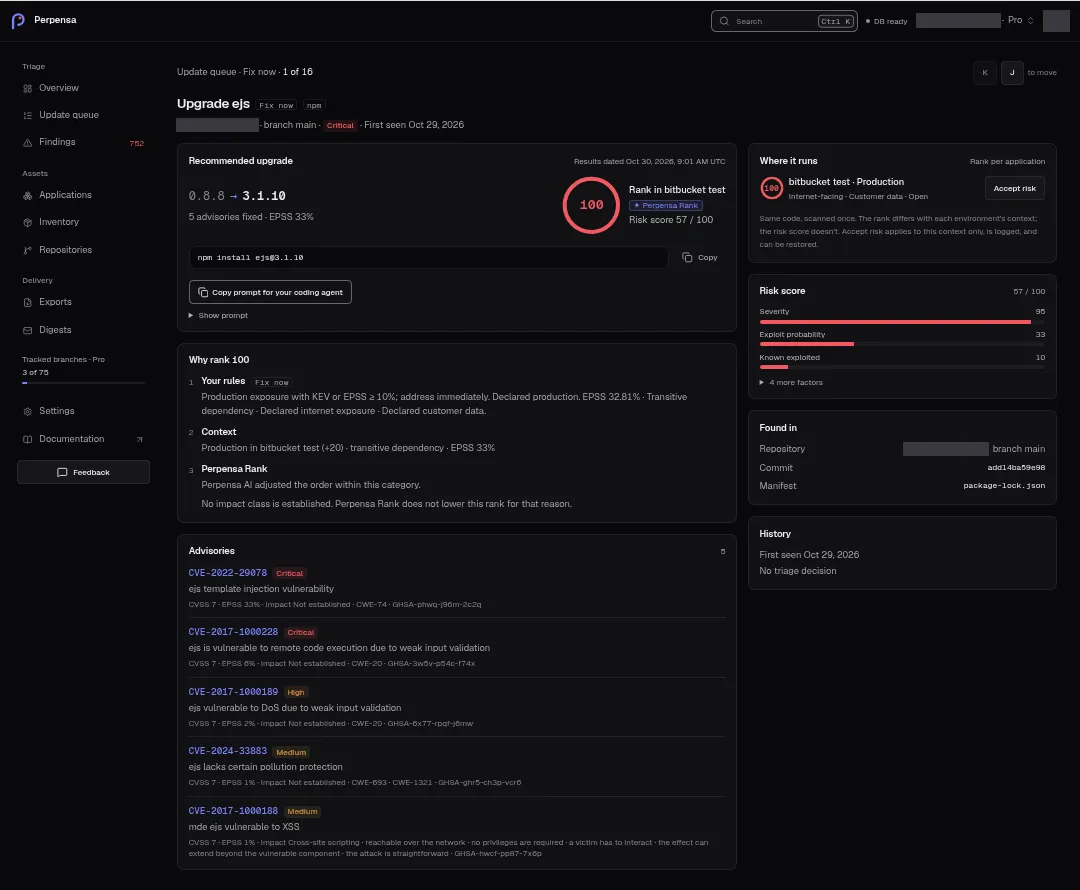
Rank explanations
Section titled “Rank explanations”The detail panel is titled Why rank followed by the displayed rank. It separates Your rules, including category and available reason, from Context, including production status, application, environment adjustment, direct or transitive dependency, and available KEV or EPSS evidence.
Links labeled Why this rank? on Overview open this detail explanation. The queue itself opens details through the package name.
Rules set categories. Perpensa Rank refines order within them on Pro and Team. Its badge requires an accepted refinement contributing to the update rank. Rules can instead indicate review kept the order, is in progress, or was unavailable; inspect its tooltip. A missing badge does not by itself mean a failure. The queue can also report how many findings are still under review while rules set the order.
When available, Ask about this update… accepts a question and Ask requests an explanation. Empty questions and questions over 4,000 characters cannot be submitted; the latter shows Limit: 4,000 characters. The pending button reads Asking…. Replies identify Generated explanation or Rules-based explanation, with an available-after time and citation links when supplied. Answers do not change rank or risk score.
A failed explanation request shows Explanation unavailable. The rule-based decision and current rank still apply.
Copy a remediation prompt or command
Section titled “Copy a remediation prompt or command”Copy prompt for your coding agent is available on every plan. It copies a prompt containing the target repository and available application, environment, reference, commit, manifest, version and advisory context. Show prompt reveals selectable text.
For owned code, the prompt distinguishes direct and transitive dependencies and calls for inspecting breaking changes and verifying the change. For accepted risk, it asks for a decision review instead of a dependency change. Public-watch prompts ask for product remediation rather than editing upstream manifests or running package commands.
Success briefly shows Copied and announces Prompt copied. Clipboard failure shows Copy is unavailable here. The prompt is open below, ready to select. and opens the text. The Starter note links Set up MCP and explains that Pro and Team can query Perpensa directly through MCP.
The command’s separate Copy button shows Command copied on success or Could not copy the command on failure. Copying does not execute anything. Review the prompt or command in your own development workflow, make and verify the change, then rescan. Perpensa never applies version bumps or opens pull requests. See Remediate a vulnerability and verify the fix.
Accept and restore risk
Section titled “Accept and restore risk”Under Where it runs, Accept risk applies to the eligible linked open finding occurrences in that environment. Restore reverses accepted decisions there. Both actions can appear when the environment contains a mix of open and accepted occurrences. They are disabled while a decision is being saved; acceptance can also be disabled when no eligible targets remain.
Decisions apply to the selected context, are logged, and can be restored. They do not change the code or the technical risk score. The page refreshes source data after the attempt. An update enters Accepted risks only when all its contexts in scope are accepted.
An action involving several occurrences can partially succeed. Some occurrences in this environment were not saved reports partial failure with the returned reason. A complete failure shows its returned error or Could not save the decision. Errors can include Active environment association not found, Open occurrence not found, Occurrence episode changed, Environment not found, or Workspace permission changed. Check the refreshed context before retrying; do not assume every occurrence was saved.
Public products and internal dependencies
Section titled “Public products and internal dependencies”A public-watch package candidate is Scanner evidence: it records a vulnerable internal dependency, not an instruction to upgrade that package independently. View product remediation opens the repository page. That link does not apply an update or confirm a product release fixes the dependency.
The repository’s Product remediation panel shows deployed version, proposed product version when verified, fixed and remaining finding counts, and Verified inventory or Evidence pending. Its dependency evidence lists package, current version, advisory and candidate outcome: a clear version, dependency removed, still affected, version unresolved, or not verified.
Possible states include Product remediation not analyzed yet, Analyzing upstream releases…, a recommended product upgrade, No product remediation needed, No fixed upstream release identified, Upstream analysis rate-limited, Upstream analysis failed, and Insufficient data for a product upgrade. The comparison checks bounded stable releases; failure or insufficient evidence does not close findings. View followed by the product name and release opens the available release link.
Change pin is a repository-list action; the product detail uses Update tracked version. The dialog lets you choose a different branch or tag and Confirm deployed version. An unchanged pin cannot be submitted. Errors include Still loading refs…, Repository mismatch, Choose or type a branch name, Choose or type a release tag, and Change pin failed with the returned reason or Unknown error. A save can report a catalog change or queued scan; neither establishes completed analysis. Changing the recorded pin does not deploy software. See Repositories for this flow, then configure the exact application source and verify its scan.
Loading, empty states and errors
Section titled “Loading, empty states and errors”| Message | Meaning or next step |
|---|---|
| Loading…, Loading updates… | Data is still loading. |
| No application sources configured. | No application groups are available; Configure Applications opens setup. |
| No results match these filters. | Change the active filters. |
| No accepted risks in this scope. | No fully accepted update matches the view. |
| Sources are scanning. Complete results will appear here. | Wait for completed source results. |
| Coverage unavailable. Open the application to reconnect or remove the affected source. | Inspect the affected application’s sources. |
| No open results in this scope. | No open candidate is available in this scope. |
| Scope unavailable | The queue could not resolve its scope; a more specific returned error can appear instead. |
| Could not read this update. | The detail page could not interpret the loaded source data. |
| Failed to load data | Detail data failed to load; a returned error can replace this fallback. |
| Update not found | The requested update could not be located. Back to queue returns to the retained scope. |
Source-loading errors are displayed as returned. An empty list or missing update is not evidence of complete vulnerability coverage. Check result dates, source warnings and the relevant application before relying on an absence of updates.